What Is a SCORM File and What Does It Actually Report to an LMS?
6/6/2026
10 min read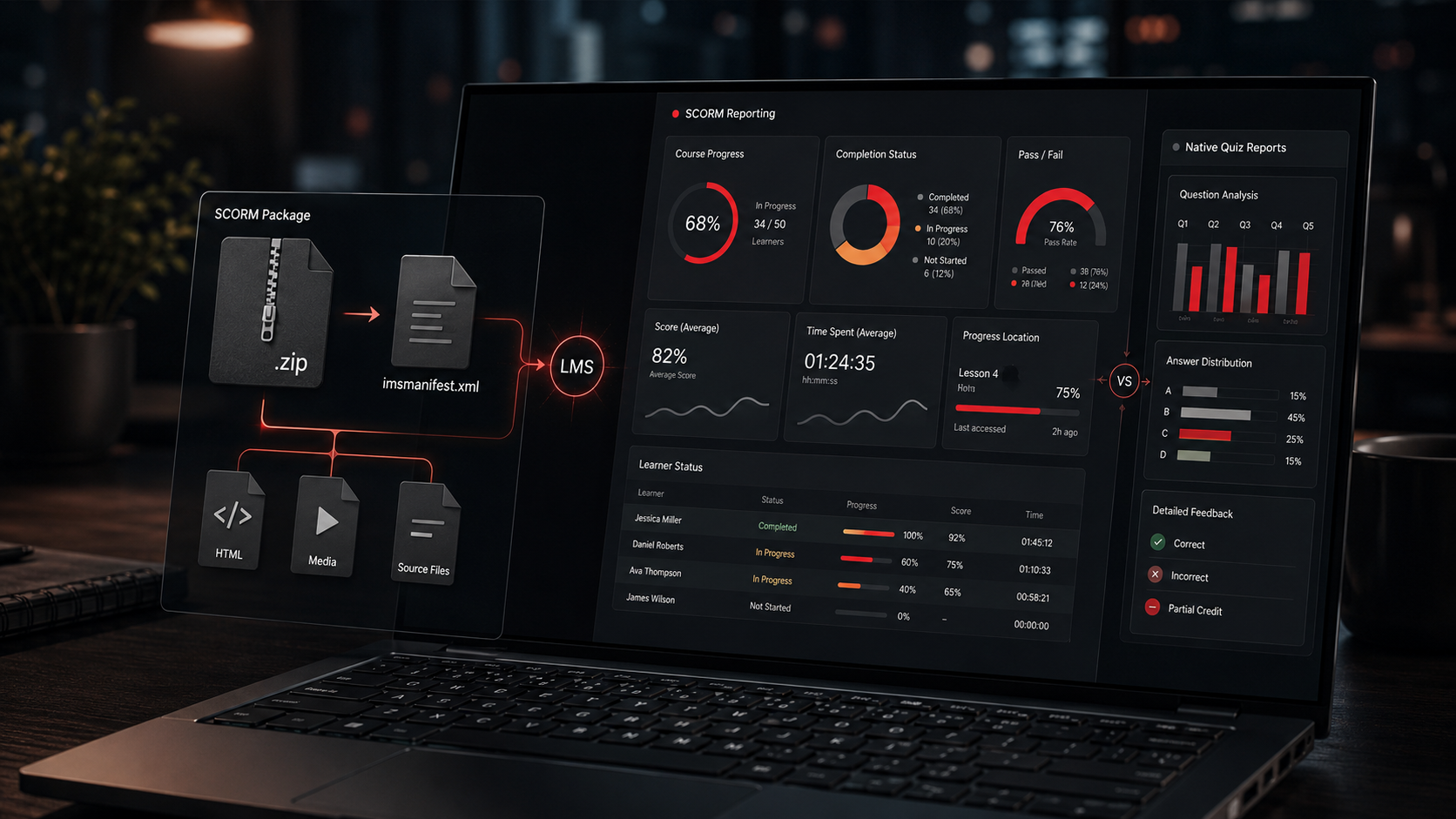
What Is a SCORM File and What Does It Actually Report to an LMS?
Why this matters
SCORM is one of those terms that gets used constantly in corporate training, but it is not always explained clearly.
A client may ask, “Can you give us a SCORM file?” An LMS administrator may ask, “Does this course report quiz data?” A stakeholder may assume that because a course is packaged as SCORM, the LMS will automatically receive detailed information about every learner interaction.
That is not always the case.
SCORM is useful, but it is also specific. It is a standard that allows an eLearning course to be packaged, launched, tracked, and reported inside a Learning Management System. It does not automatically mean the LMS receives every click, every answer choice, every text response, or every detailed learner behavior inside the course.
A SCORM file helps the LMS launch and track a course, but it does not magically turn every course interaction into detailed LMS reporting.
Understanding that difference is important when designing corporate training, compliance courses, assessments, and learner reporting workflows.
What is SCORM?
SCORM stands for Shareable Content Object Reference Model.
In practical terms, a SCORM file is usually a zipped package that contains a structured set of files an LMS can read, launch, and track. The package may include HTML files, JavaScript files, media assets, images, videos, interaction files, configuration files, and a required manifest file that tells the LMS how the package is organized.
One simple way to think about a SCORM course is to imagine a small website packaged inside a zip file.
Like a website, the course may have different pages, screens, menus, buttons, videos, quizzes, and interactive elements. The learner moves through that experience by selecting buttons, completing sections, watching videos, answering questions, or progressing through slides.
But unlike a normal website, a SCORM package is designed to communicate with an LMS using a defined standard.
That standard allows the course and LMS to exchange certain types of information, such as whether the learner launched the course, how long they spent in it, whether they completed it, whether they passed or failed, and what score was reported.
SCORM is not just the course file. It is the communication method between the course and the LMS.
What is inside a SCORM package?
A SCORM package is commonly delivered as a .zip file. That zip file should not usually be unzipped and uploaded as separate files unless the LMS specifically requires that type of workflow.
Inside the package, there are usually several types of files working together:
- HTML files that display the course content in the browser
- JavaScript files that control course behavior and SCORM communication
- Media files such as images, audio, video, icons, or animations
- Player files that manage navigation, menus, buttons, and course layout
- Data files used by the course to load slides, lessons, questions, variables, or interactions
- The manifest file that tells the LMS how to identify and launch the content
This is why a SCORM package should usually be treated as a complete structured package, not as a single video or document.
When the LMS launches the course, it loads the correct starting file and allows the course to run in the learner’s browser. The course then uses JavaScript-based SCORM communication to send specific data back to the LMS.
The zip file is the package. The course player is the experience. The SCORM standard is the communication layer.
The role of the manifest file
One of the most important files inside a SCORM package is the manifest file. This file is usually named imsmanifest.xml.
The manifest file acts like a set of instructions for the LMS. It identifies the structure of the course package and tells the LMS where the launch file is located.
Think of it like the course package’s table of contents and launch map.
The manifest helps the LMS understand:
- That the zip file is a SCORM package
- Which file should be launched first
- How the learning object is organized
- What resources are included in the package
- How the LMS should register the course item
Without the manifest file, many LMS platforms would not know how to interpret the package correctly.
This is one reason why editing a published SCORM package manually can be risky. Removing, renaming, or changing the wrong file can break the connection between the course and the LMS.
The manifest file helps the LMS recognize, import, and launch the SCORM content correctly.
How SCORM communicates with an LMS
When a learner launches a SCORM course from an LMS, the course does not simply play like a standalone video. It opens inside an LMS-controlled environment and attempts to establish communication with the LMS.
That communication usually happens through a browser-based JavaScript API. The course sends data to the LMS at specific moments, often based on how the course was published from the authoring tool.
For example, the course may send information when:
- The learner launches the course
- The learner reaches a certain slide, page, or lesson
- The learner completes a required percentage of the course
- The learner finishes a quiz
- The learner passes or fails an assessment
- The learner exits the course
This communication is based on predefined SCORM data fields. The course does not simply send unlimited information to the LMS. It sends specific values that the LMS is prepared to receive and store.
For example, a SCORM package may report a completion status, success status, score, session time, total time, location, suspend data, or other supported values depending on the SCORM version and how the course was built.
SCORM reporting is based on defined data fields, not unlimited learner analytics.
What SCORM can report
SCORM can report useful learner progress data to an LMS. This is why it remains common in corporate training environments.
Depending on the LMS, SCORM version, and publish settings, a SCORM course may report information such as:
- Whether the learner launched the course
- Whether the course is incomplete, completed, passed, or failed
- The learner’s score
- The minimum, maximum, or raw score
- The amount of time spent in the course
- The learner’s last known location in the course
- Bookmarking or resume data
- Whether a quiz or final assessment was passed
This type of reporting is useful for many corporate learning needs. For example, an organization may need to know whether an employee completed required training, passed a knowledge check, or spent time in a required learning module.
SCORM can support that type of tracking.
However, it is important to understand that SCORM reporting is not the same as a full learning analytics platform. It is not automatically a detailed question-by-question reporting system, and it does not always provide the same level of insight as an LMS-native quiz or assessment tool.
SCORM is good at reporting specific course-level outcomes. It is not always good at reporting deep learner behavior.
Why SCORM quiz reporting can be limited
One of the most common misunderstandings about SCORM is quiz reporting.
Many stakeholders assume that if a course contains quiz questions, the LMS will automatically receive detailed data for every question, every answer choice, every attempt, and every learner response.
In many real-world LMS workflows, that is not what happens.
A SCORM course may report that the learner passed or failed. It may report a score. It may report completion. But it may not provide the LMS administrator with a clean, native, question-by-question report showing exactly which option each learner selected for every question.
This depends on several factors:
- The SCORM version used when publishing
- The course authoring tool
- The LMS implementation of SCORM reporting
- The reporting settings selected during publishing
- The way the quiz was built inside the course
- Whether the LMS exposes interaction-level data in its reports
Tools such as Articulate Storyline 360, Articulate Rise 360, Adobe Captivate, iSpring, and other eLearning authoring tools can publish SCORM packages. These tools control much of the learner experience inside the course, including quiz logic, remediation, branching, feedback, retries, slide progression, and completion triggers.
The LMS may only receive the final values that the course sends through the SCORM communication layer.
For example, the LMS may receive:
- Completed
- Incomplete
- Passed
- Failed
- Score: 85%
- Total time: 32 minutes
That information is useful, but it may not answer deeper assessment questions such as:
- Which specific question did learners miss most often?
- Which wrong answer was selected most frequently?
- Did a department or cohort struggle with the same concept?
- Did learners improve between attempts?
- Which question may need to be rewritten?
A SCORM quiz can confirm completion and performance, but it may not give the same reporting depth as an LMS-native quiz.
What the course authoring tool controls
Another important distinction is the difference between what happens inside the course and what gets reported to the LMS.
The authoring tool controls the course experience. This includes how the learner navigates, what happens when they select a wrong answer, whether they can retry, whether they receive feedback, and when they are allowed to continue.
For example, in a tool like Articulate Storyline 360, the developer may create variables, triggers, layers, branching scenarios, custom feedback, simulations, and conditional navigation. In Rise 360, the developer may use blocks, lessons, knowledge checks, quizzes, interactions, and completion settings. In Captivate or iSpring, similar course logic can be created using each tool’s own features.
All of that may happen inside the course experience.
But not every internal course event becomes a detailed LMS report.
For example, a course might internally know that the learner clicked a certain button, viewed a certain layer, selected a specific incorrect answer, retried a scenario, or typed a short response. Unless that information is intentionally stored, mapped, and reported through supported SCORM data fields or another reporting method, the LMS may never expose it as useful report data.
This is where expectations matter.
If the business requirement is simply, “We need learners to complete the training and pass the final assessment,” SCORM may be enough.
If the business requirement is, “We need to analyze how every learner answered every question and identify performance trends across departments,” a SCORM-only approach may not be enough.
The course can contain rich interactions that the LMS never sees in detail.
Why LMS-native assessments are often still useful
Because of SCORM’s reporting limitations, many organizations use a blended approach.
They place the learning content, scenarios, interactions, videos, and practice activities inside the SCORM course. Then they use the LMS’s native quiz or assessment tools for the final graded assessment.
This approach can give LMS administrators better access to question-level reporting because the quiz lives directly inside the LMS instead of inside the SCORM package.
An LMS-native quiz may make it easier to report on:
- Question-level performance
- Common wrong answers
- Attempt history
- Department or cohort performance
- Item analysis
- Pass/fail trends
- Assessment improvement over time
This does not mean the SCORM course is less valuable. It means the SCORM course and LMS assessment tool are doing different jobs.
The SCORM course can provide the engaging learning experience. The LMS-native quiz can provide structured assessment data.
SCORM is often best for delivering the learning experience. LMS-native quizzes are often better for detailed assessment reporting.
A blended approach to SCORM and LMS assessment
For many corporate training projects, the best solution is not choosing between SCORM and LMS tools. It is using both intentionally.
A strong blended approach may look like this:
- Use a SCORM course for the instructional experience
- Include interactive scenarios, simulations, videos, and practice questions inside the SCORM
- Use SCORM reporting for completion, progress, time, and pass/fail status
- Use LMS-native quizzes when detailed question-level reporting is required
- Use LMS reports to identify patterns across learners, teams, or departments
- Use the data to improve the course and support future training decisions
This approach gives learners a better experience while giving administrators more useful reporting.
It also helps avoid a common problem: expecting one SCORM package to do everything. A SCORM file can be powerful, but it is still part of a larger training ecosystem.
The course authoring tool, SCORM package, LMS, native quiz engine, reporting dashboard, and administrative workflow all play different roles.
The best training solutions are not just packaged correctly. They are designed around the learning goal, reporting need, and administrative reality.
If you need help creating an engaging SCORM course, improving an existing course, or planning a blended approach that combines SCORM content with LMS-native assessments, I can help you think through the learning experience and reporting strategy.
Contact me on Fiverr to discuss your eLearning course project or consultation.
Related Posts
How I’d Adapt a Credit Score Course for Workplace Financial Wellness
A credit score course can explain the basics, but business buyers often need more than information. Here’s how I’d adapt this topic for workplace financial wellness with two practical feature upgrades that support learner confidence and real-world application.
How I’d Adapt a Job Search Course for Workforce Readiness
A basic job search course can inform learners, but business buyers usually need more than information. Here’s how I’d adapt this course with two practical feature upgrades that support rehearsal, reflection, and better on-the-job relevance.
How I’d Turn Time Management Essentials Into Better Workplace Training
A solid time management course covers the basics. For business buyers, the real question is how to make those lessons stick at work. Here’s how I’d adapt this course with two targeted feature upgrades.
Ready to map your custom course upgrade?
Book a discovery call to plan a practical rollout for your team.
Contact Adam